
Important Note
This is not a comprehensive guide. This will explain how to get started synchronizing your e-commerce/external sales to KORONA. If you have further questions or need support, email us at support@koronapos.com
Intro
To keep everything accurate, KORONA does not just randomly add or remove inventory when an external sale happens. Instead, it syncs external sales by generating a Receipt for every single transaction. When a customer checks out on your external system (like an online store or mobile app), the API pushes that transaction into KORONA as a receipt. This ensures that your inventory, revenue reports, and taxes are updated automatically—exactly as if a cashier had rung up the sale in-store.
Obtaining API Credentials
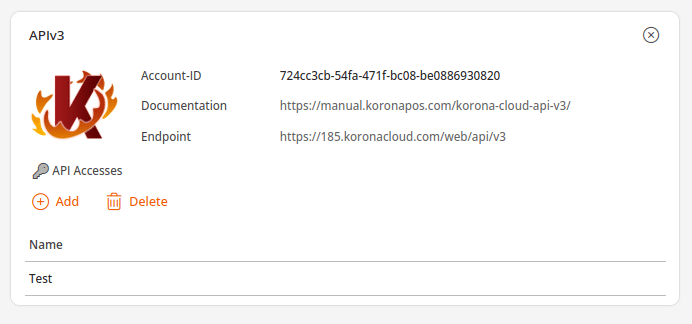
- Go to Settings > Data Exchange
- Type api into the search bar at the top and press Add
- Press Add in the APIv3 widget below.
- Create a Login and a Name (name is for display, login is actual credentials). Password will be automatically generated.
The “External POS” Setup & Licensing Requirement
To accept these incoming receipts, KORONA needs a dedicated “register” to assign them to.
- External POS Type: Inside the KORONA back office, a new Point of Sale must be created, and its system type must be defined specifically as an External POS.
- 1 Extra POS License: Because KORONA treats this connection as a fully functioning, dedicated checkout register within its ecosystem, setting up this External POS will require one additional POS license on your account.

Coupling the Systems
To securely link your external software to this new External POS, the API relies on a Coupling ID.
You, as the integrator, generates and keeps track of this Coupling ID.
By passing this ID through the API, the external system proves its identity to KORONA. This successfully “couples” the two systems, ensuring that all incoming receipts are securely routed to the correct External POS.
Relevant API Endpoints
Below are the main API endpoints that will be used, along with links to our API documentation with examples for each.
- GET /api/v3/accounts/{accountId}/pointsOfSale
The integrator uses this endpoint to retrieve the list of registers, locate the newly created “External POS,” and gather the necessary details to set up the connection.
https://manual.koronapos.com/korona-cloud-api-v3/#tag/points-of-sale/operation/getPointsOfSale
- PATCH /api/v3/accounts/{accountId}/pointsOfSale/{posId}
This is used to officially link the external application to the designated KORONA register using the Coupling ID that the integrator keeps. Pass “couplingId” as a parameter.
https://manual.koronapos.com/korona-cloud-api-v3/#tag/points-of-sale/operation/updatePointOfSale
- POST /api/v3/accounts/{accountId}/pointsOfSale/{posId}/receipts
Once coupled, your integration uses this endpoint to push the transaction data into KORONA. Every time a sale occurs externally, a payload is sent here to book the sale and generate the receipt in the KORONA system.
https://manual.koronapos.com/korona-cloud-api-v3/#tag/points-of-sale/operation/addPointOfSaleReceipts