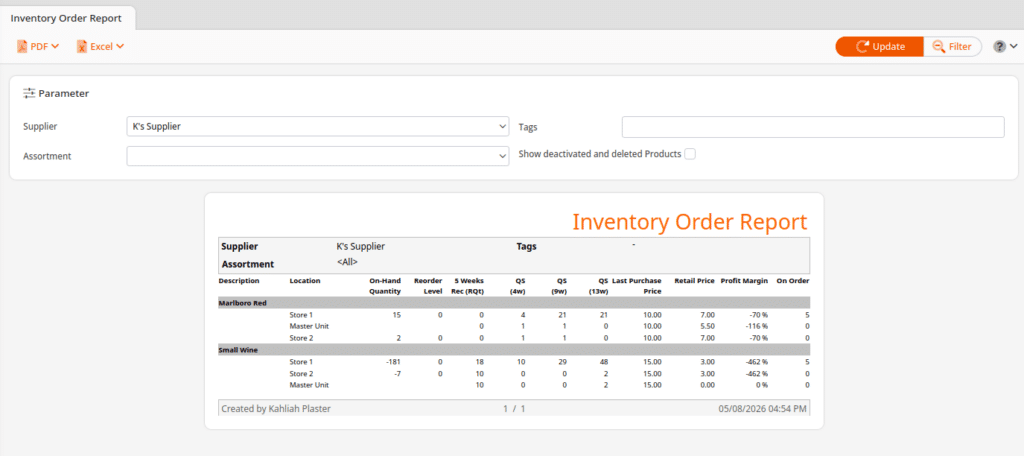
The Inventory Order Report is a useful report to give insight into your ordering for specific suppliers. It allows you to look at all your products from a specific supplier and see information such as your current on-hand quantities, a 5 week recommended order amount, past weekly sales, and your cost and retail price. This report is optimized for multi-location businesses, but can also be helpful for single location stores as well.
Parameters
At the top, the Parameters section allows you to limit the scope of the report.
The first option, Supplier, is required and allows you to narrow down the report to just that supplier.
The second option, Assortment, allows you to narrow down the results to a specific assortment.
The third option, Tags, will let you add tags so that you can further narrow down the results. This would allow you to see a subset of the suppliers products that have those tags, rather than all of the suppliers products.
The fourth option, Show deactivated and deleted products, would allow deactivated and deleted products to also show up in the list on the report alongside normal products.
Column Headers
- Description – Product name
- Location – Warehouse name
- On-Hand Quantity – Current stock amount for that warehouse
- Reorder Level – Reorder level setup for that warehouse
- 5 Weeks Rec (RQt) – Recommended ordering quantity for the next 5 weeks of sales based on recent sales
- QS (4w/9w/13w) – Quantity sold for the past 4 weeks, 9 weeks, and 13 weeks
- Last Purchase Price – Most recent cost for the product (from the Product page)
- Retail Price – The retail price you are selling the product for
- Profit Margin
- On Order – Quantity on order from any non-finished Stock Orders